

Excel® vs. Web-Based T&A: Why Spreadsheets Are the Wrong Tool for Production Timelines
Most fashion businesses know this scenario. A production milestone slips on a Tuesday. The supplier updated their own copy of the spreadsheet but not the shared one. By the time the merchandising team finds out on Thursday, the window to resequence cleanly (adjust the vendor, shift the priority, protect the delivery date) has already closed. The only options left are expensive.
I have watched this happen more times than I can count. We founded Axind in 2004 to build software for fashion supply chains, and in twenty years working with brands, buying houses and manufacturers across Europe, Asia and North America, spreadsheet-based T&A has been the single most consistent source of late seasons I have seen. Not because the people running them aren’t good at their jobs. The tool itself can’t do what a T&A calendar needs to do.
Axind WebTnA now runs in more than 20 countries, across brands, buying houses and manufacturers, and the same story repeats almost everywhere a spreadsheet finally gets retired.
Spreadsheet-based T&A calendars (Excel®, Google Sheets, or anything similar) work. Until they don’t. The question is not whether a spreadsheet can track a production timeline, it obviously can. It is whether it can do the job a T&A calendar actually needs to do: surface risk early enough to act on it, keep every team on the same plan, and give you a live view of a season in motion.
On those requirements, the spreadsheet structurally fails. Here is why, and what a purpose-built web-based T&A system changes.
What a T&A calendar actually needs to do
It is worth being precise about the job before evaluating the tools. Most fashion businesses treat T&A as a scheduling task. It is not; it is a risk management task. The schedule is just the means.
A T&A system needs to:
Give every team (design, sourcing, production, vendors, leadership) a single live view of the season, updated as things happen
Alert people before deadlines are missed. An alert that arrives after the deadline is worthless
Map dependencies across activities, so when one milestone slips, you see what else moves with it
Create clear accountability: who owns each activity, the deadline, and whether it is on track, without needing a status call to find out
Build a performance record across seasons, so you can see where delays originate and build smarter calendars
Measured against these requirements, a spreadsheet covers the first item partially, and most of the rest not at all.
If your T&A is already slipping by a week or two most seasons, that gap alone is usually reason enough for a closer look.
What spreadsheets do well, and where they break down
This is not an argument that spreadsheets are bad tools. They are precise tools asked to do something they were not designed for.
A spreadsheet is excellent for planning: building a timeline, laying out activities, setting target dates. For a small operation with a handful of suppliers, low update frequency and a single internal team, it is genuinely sufficient.
The problems emerge at scale and velocity. Specifically:

The typical spreadsheet T&A: a planning document that requires human effort to stay current.
Version control
Email a spreadsheet or upload it to a drive, and it forks: two people are now working from files that will diverge, and updates do not reach the other side unless someone manually reconciles them. Live, multi-editor tools like Google Sheets avoid that specific failure, one link, no forking. What they do not avoid is what happens once everyone is inside the same file: shared across several suppliers and teams, a sheet accumulates tabs, broken formulas and accidental overwrites, with no record of who changed what or why. Version chaos and edit chaos turn out to be the same root problem wearing different clothes, i.e. a flat file asked to behave like a managed system.
Version control
The spreadsheet only knows what someone typed into it. If a vendor’s production is running three days late, that information exists in a WhatsApp message or a status call, not in your T&A, until someone updates the file. That gap is where seasons get lost.
No alert logic
A spreadsheet can highlight an overdue date in red, but it cannot proactively contact a supplier who has not updated their milestone, or flag on Monday morning that three activities are behind and two sit on the critical path. It shows you what you already know. It does not surface what you do not.
This is exactly the shape of the problem Experience Group, a global apparel manufacturer running hundreds of orders a season, lived with before they switched. Managers had to ask, constantly, for status, and delays only surfaced once they had already happened. Nothing in their spreadsheet was wrong. It just had nothing to say until someone went looking.
No dependency mapping
Change a date in a spreadsheet and nothing else moves. You have to manually trace the downstream impact of every adjustment: which activities depend on the one that changed, which deliveries are now at risk. At the start of a season with 200 styles, this is a full-time job.
Supplier visibility
Google Sheets solves part of this. A supplier can view and edit the same live file you do, so there is no separate copy to email back and forth. What it does not give you is structure, no record of which supplier owns which activity, no automatic reminder before a deadline, no scorecard showing who actually delivers on time across a season. A live grid tells you what the data currently says, not whether the supplier behind it is reliable.
Mobile access
Nobody updates a complex spreadsheet from a factory floor or a trade show. On mobile, a spreadsheet is fine for reading and close to useless for any meaningful update. That gap, the time between something happening on the factory floor and when it gets recorded in your T&A, is where risk hides.
What a live web-based T&A system changes
The shift is not cosmetic. Moving from a spreadsheet to a purpose-built web T&A system changes how a season is actually managed.
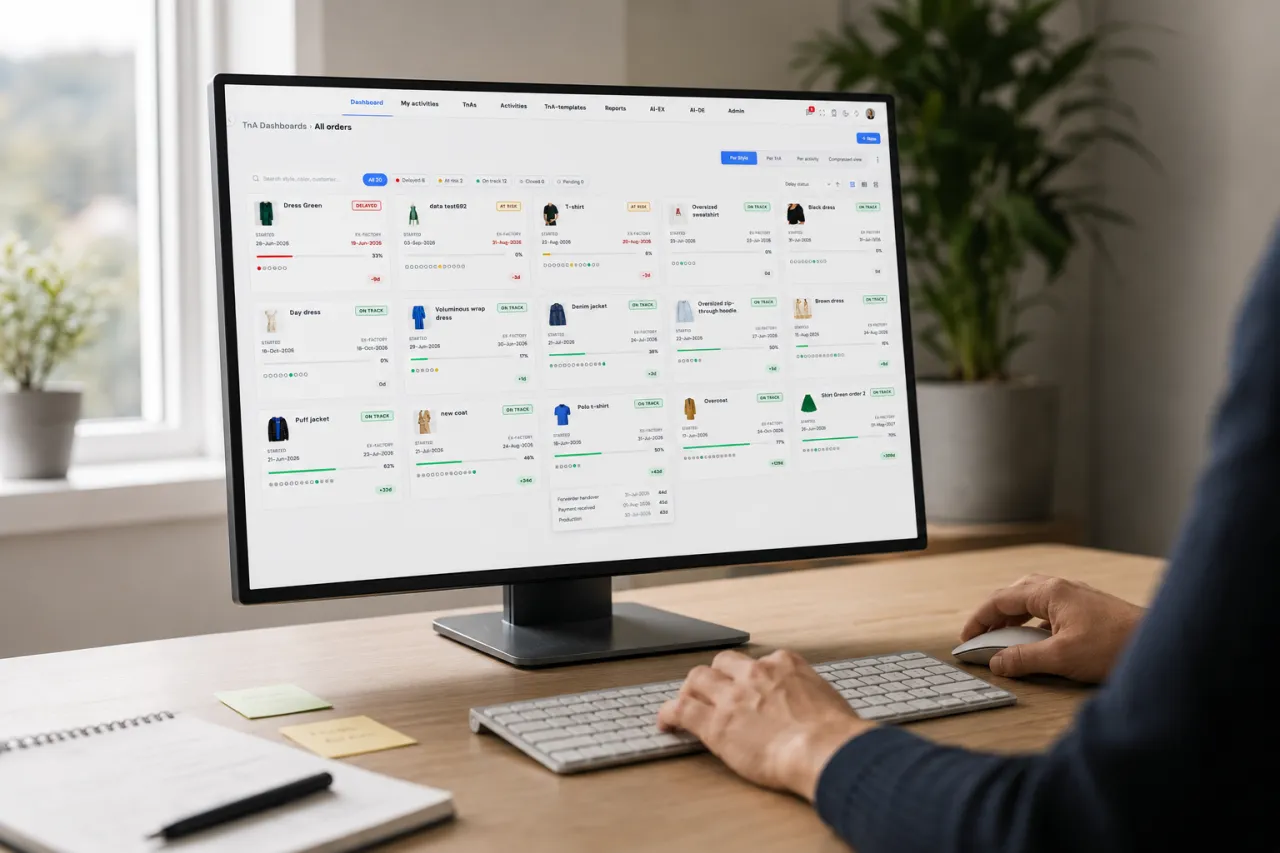
The typical spreadsheet T&A: a planning document that requires human effort to stay current.
With Axind WebTnA, there is one timeline. Every team, internal and external, works from the same plan, updated in real time. There is no version to reconcile because there is no version.
Suppliers update activities directly. The moment something is marked complete or flagged as delayed, every team sees it at once, without an email, a call, or a file update. Status meetings become conversations about decisions, not sessions to collect information that should already be visible.
Automated alerts go out before deadlines are missed, and because the system tracks dependencies, a slipped activity immediately shows its downstream impact across the full critical path. “What-if” planning lets you model a change before committing: shift one activity and see, in real time, what else moves with it.
On mobile, factory floor updates sync instantly into the shared timeline. A supplier closing an activity at 6pm in Dhaka is visible to a merchandising manager in Amsterdam before the next morning briefing.
99%
On-time delivery rate · Experience Group, Bangladesh
After replacing spreadsheet-based T&A management with Axind WebTnA
“With Axind WebTnA we have significantly improved how our merchandising team manages timelines and closes activities on time. We are now achieving 99% on-time delivery, and the system is simple to use from T&A creation through to final closure.”
Khalid Shams Chowdhury, Division Head of Merchandising, Experience Group, Bangladesh
Every Experience Group order now runs through one system. Every manager works from a live dashboard, and nobody needs to ask anyone for status. The result: 99% on-time delivery across a large, multi-order operation, with visibility running from a high-level summary down to a single TnA, and a switch that did not take months to implement.
The real cost of running T&A on a spreadsheet
The argument for switching often gets framed around efficiency, how much time your team saves. That is real, but it understates the case.
The bigger cost is late visibility. A delay that surfaces in a spreadsheet surfaces after the fact: someone noticed, someone updated the file, someone checked it. By then the response window has compressed, and the options that existed three weeks earlier (resequencing, supplier substitution, adjusting the critical path) are gone. What is left is expensive.
Air freight to recover a delayed shipment. A markdown because product arrived after the selling window. A buyer penalty clause triggered by a late delivery. These are what happen when a system shows you what happened, not what is about to.
There is also a headcount cost. Consider how much of your merchandising team’s time goes to chasing status updates a live system would surface automatically. Status calls. Chase emails. Spreadsheet reconciliation. None of that is productive work, it is the overhead of operating without real-time visibility. A live T&A system does’t just replace the spreadsheet. It recovers that time.
Poeticgem, a UK-based sourcing agent with $400 million in annual turnover, used to absorb exactly this kind of headcount cost by re-keying buyer orders into TnA calendars by hand, one order at a time, across PDFs, complex Excel files and multi-sub-order documents that each needed handling differently. With Axind’s AI-Order-Importer feeding directly into WebTnA, that manual step is gone: buyer orders are extracted, mapped to the style master, and converted straight into a live timeline, milestones assigned to the right teams before anyone touches a keyboard.
“My team says it’s probably one of the best systems they’ve seen, and they’ve seen many,” said Aakash Chugh, Manager of Digital Products at Poeticgem. “We’re never going back to our old way of working.”
Seeing your own order data convert into a live timeline like that, instead of another file someone has to chase, is exactly what a WebTnA demo shows in real time.
How to know if you have outgrown a spreadsheet for T&A
Not every operation needs to make this switch today. The signals that you have outgrown a spreadsheet-based T&A are specific and recognisable:
Signs your T&A needs a live system
- You are managing more than two or three active suppliers in a season
- You have had a shipment delay that you found out about too late to fix cleanly
- Your team spends more than an hour a week chasing supplier status updates
- Your T&A is shared as an email attachment, not accessed live from a single source
- You have had two versions of the same timeline in circulation simultaneously
- Your season debrief includes a conversation about delays that nobody saw coming
If any of these sound familiar, the gap between where you are and where Experience Group is now is probably narrower than it looks. The infrastructure exists. The question is whether you are using it.
It is not only a T&A problem, either. One Friday, a vertically integrated children’s fashion brand running design, manufacturing, retail, wholesale and e-commerce, had pushed large parts of its operation back onto Excel simply because its other systems could not cover the gap. WebTnA was one piece of fixing that, alongside Axind’s PLM+ and OMNI. “With Axind, I can do it all on one single platform,” said Meet Sawhney, CEO of One Friday. “Otherwise, I would have to integrate maybe three or four different tools.” Same underlying habit, different business: work that should live in one system, scattered across several until something forces the question.
A 30-minute demo of Axind WebTnA will show you what your specific T&A structure looks like in a live system: your suppliers, your milestone types, your team. Not a generic walkthrough.
See Axind WebTnA for your operation.
Your timeline structure, your supplier coordination, your season. We get to your specifics fast. Most teams are live within one to two weeks.
How to know if you have outgrown a spreadsheet for T&A
Do we need to replace our entire process to use WebTnA, or can we start with just the T&A calendar?
Most teams start where they are, with the T&A calendar they already run, just live instead of static. WebTnA connects to PLM+, SCM and OMNI when you are ready, but nothing requires switching everything at once.
How long does implementation actually take?
A week, maximum two. Experience Group’s move from spreadsheets to a live dashboard did not require a long rollout, and pricing is tailored to team size and modules from the start, not bundled into a generic package.
We already have a process that mostly works. Why change it?
“Mostly works” is doing a lot of work in that sentence. A process that surfaces delays after they have already happened is not managing risk, it is recording it. The real question is what a few weeks of late visibility costs you each season, and whether anyone has actually added that number up.
Can suppliers update WebTnA directly, or does everything still route through our team?
Suppliers update their own activities directly. The moment something is marked complete or flagged as delayed, every team sees it immediately, without anyone forwarding a file or making a call.
Does this only work for manufacturers, or does it fit buying houses and brands too?
All three. WebTnA runs across manufacturers, buying houses and brands in more than 20 countries, and the underlying problem, a plan everyone trusts versus a document nobody updates, looks the same regardless of where you sit in the supply chain.
ABOUT THE AUTHOR
Sanjoy Sahgal
Founder, Axind Software B.V.
Sanjoy founded Axind in 2004 with a single focus: building software designed specifically for the fashion and lifestyle industry, not adapted from manufacturing or retail platforms. Over the past two decades, Axind has worked with fashion brands, buying houses and manufacturers across 20+ countries, from early-stage labels managing their first collection to established groups running 60+ designers across multiple brands. Sanjoy writes about fashion operations, supply chain technology, and the practical realities of scaling a fashion business without losing control of the season.
